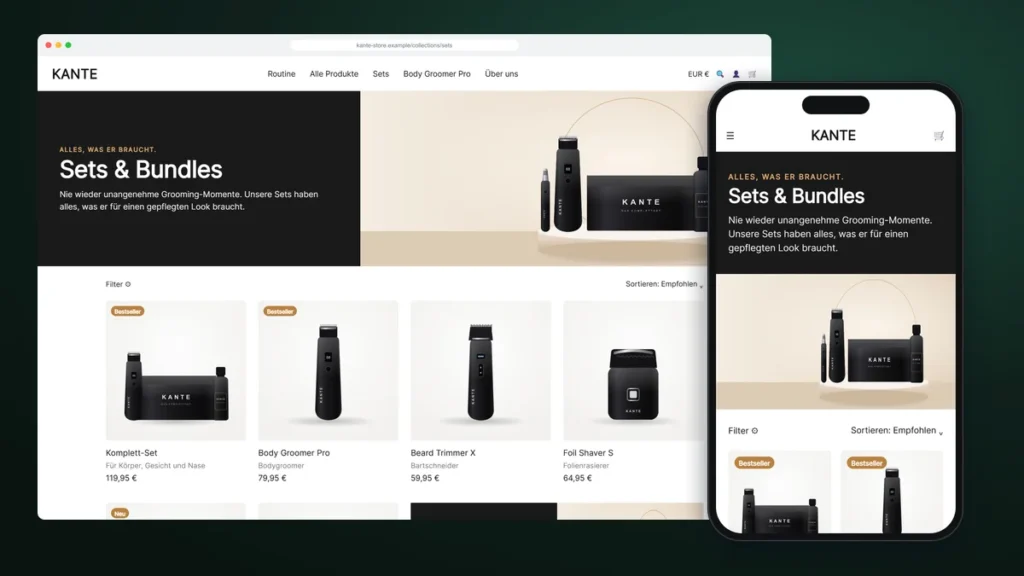
KANTE’s best margin is in its sets. But the “Sets & Bundles” collection was a plain grid: same cards, same order, no story. Jonas wanted the page to explain why a set beats buying single products, without losing the filters his customers use.
Here is how we built a custom Shopify collection page template that does exactly that, and why it did not change a single existing collection.
About this story: KANTE is a fictional brand. The project is a composite of real Shopify work we have delivered, with names, products and details changed. The sections, problems and solutions are real.

| Client | KANTE, men’s grooming, Berlin (fictional) |
|---|---|
| Goal | Sell more sets and bundles |
| Delivered | Collection template, dynamic split header, promo card block |
| Kept | Filters, sorting, infinite scroll |
| Risk to other collections | None (additive changes only) |
Tell us what you need. You get a fixed quote, a preview link before launch, and code you own.
A header that sets the scene

The new split header pairs a short pitch with a product image. It is dynamic by default: the heading falls back to the collection title, the text to the collection description, and the image to the collection image or the first product. Any collection can use the template without extra setup.
A promo card inside the product grid
Shoppers scan grids quickly. A large promo card placed after the sixth product interrupts that scan at the right moment, with a featured set, an image and a button. The team chooses its position, product, copy and colours in the editor. On mobile it takes a full row so the text stays readable.
“Will this change my other collections?”
Jonas asked this first, and it is the right question. The answer was no, because both changes to the theme were strictly additive: a new block type that only exists where you add it, and an optional product subtitle that only appears when a product has a value in a metafield. We still tested everything on a copy of the live theme first.

Why this sells more bundles
- The header explains the value of a set before the first product
- The promo card highlights the best-margin bundle at the moment of scanning
- Filters and sorting still work, so comparison shoppers are not lost
- The same template works for every collection you assign it to
Branded headers, promo cards in the grid and product-card extras, with your filters untouched.
FAQ
Will my filters still work?
Yes. We extend the theme’s own collection section, so filtering, sorting and pagination stay exactly as they are.
Can I use the template on several collections?
Yes. Assign it to any collection in the Shopify admin.
What happens when my theme updates?
You get installation notes. The small additive edits are easy to reapply in a new theme version.
Can the promo card show different products per collection?
Yes. Each collection template instance has its own card settings.